
Here's a screenshot of mine, taken this week:
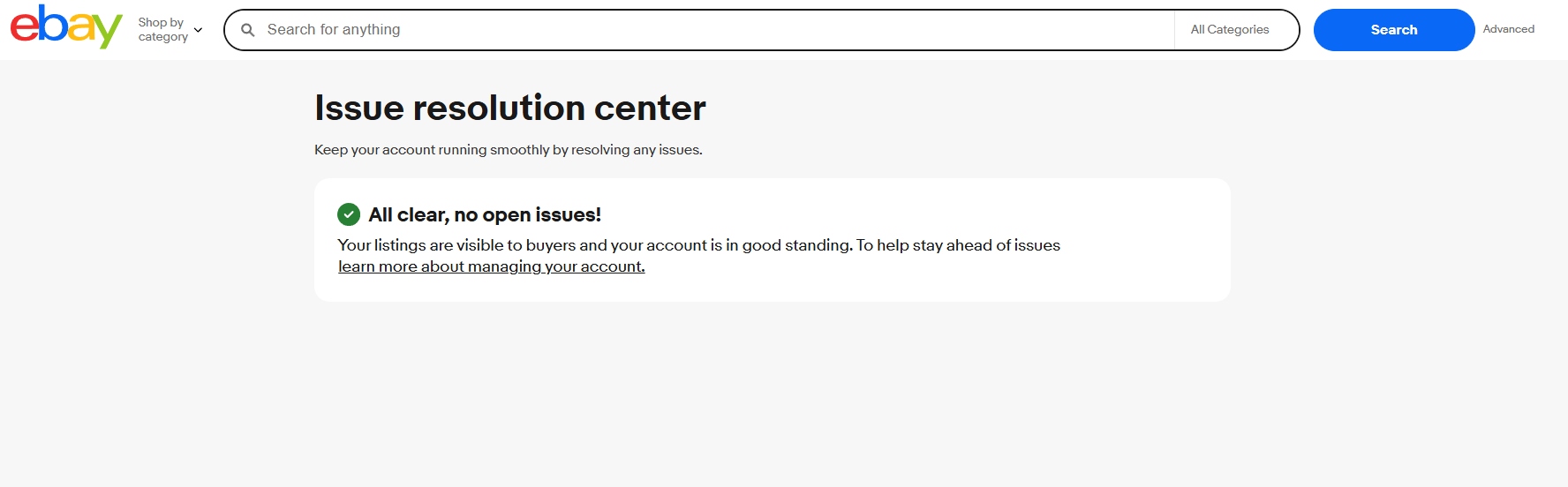
Green check. All clear, no open issues. Listings visible to buyers, account in good standing. That's the state every eBay seller should be aiming for, and a few months ago there wasn't really a single place to verify it. There is now.
eBay launched the Issue Resolution Center in March 2026 as part of the Spring Seller Update. By the end of April it was live for all U.S. sellers. Source: Value Added Resource
Most sellers I've talked to haven't even opened it yet. Which is exactly why it's worth understanding right now, before you need to.
What the Resolution Center Actually Is
Before this launched, compliance issues on eBay came at you through a mess of different channels: email alerts buried in your inbox, a banner here, a Message Center notice there, a defect on your performance dashboard somewhere else. Miss one and your listings could disappear or your account could get restricted with what felt like no warning.
The Resolution Center consolidates all of it into one dashboard inside Seller Hub. Every open compliance task, every policy violation, every account-level issue — it lives in one place with clear deadlines and step-by-step instructions for fixing each one.
In eBay's own words:
“With clear prioritization, step-by-step guidance, and built-in remediation actions, the Issue Resolution Center makes it easier to discover and resolve issues that could impact your ability to sell.”
Source: EcommerceBytes, May 21, 2026
You get to it through Seller Hub under the Performance tab. If you have open issues, you'll see a count badge. If you don't, you get the screen I'm showing above.
The Four Issue Types It Tracks
eBay's announcement spells out exactly what gets routed through the Resolution Center. There are four buckets:
- ID verification. Completing identity verification on your account, or addressing gaps in it.
- Negative account balance. Paying off any fees or refund obligations that have put your account in the red.
- Tax information. Providing the tax info eBay needs to keep paying you out.
- Policy issues on listings. Addressing things like product safety, regulated items, intellectual property complaints, and category compliance.
Source: eBay April 2026 Seller News via Value Added Resource
That covers a huge swath of what used to be “wait, why was my listing pulled?” situations. Now there's a single screen that tells you what was flagged, why, and what to do about it.
How You Get Notified (And What the Red Banner Means)
This is the part that matters most, and the part most sellers miss. eBay laid out the notification system in their April update:
“Get notified — When action is required, you'll receive an email for listing-level issues and see a red banner in Seller Hub for account-level issues.”
Source: eBay April 2026 Seller News via Value Added Resource
So there are two flavors of notification, and they're not the same:
- Listing-level issues → email. A specific listing got flagged for a policy issue, product safety question, missing required info, that kind of thing. eBay sends an email. The listing may stay up while you address it, or it may come down depending on severity.
- Account-level issues → red banner in Seller Hub. Something is wrong at the account level — ID verification gap, negative balance, missing tax info, repeated policy violations. This shows up as a red banner the moment you log into Seller Hub. It's the more serious of the two.
Why the Red Banner Is the One to Watch
An account-level red banner means your ability to keep selling is at risk. If you ignore it, listings can be demoted in search, payouts can be held, and in severe cases the account can be restricted or suspended. The whole point of the new Resolution Center is to give you a clear way to fix the issue before it gets to that point — but only if you actually open it and follow the steps.
Priority Tiers Inside the Resolution Center
Not every issue is created equal. Inside the Resolution Center, each item gets a priority tag, and the timelines are real:
| Priority | What It Means | Response Window |
|---|---|---|
| Urgent | Severe policy violations, account-restricting issues | 24 to 48 hours |
| High | Repeat infractions, listings already affected | Several days |
| Medium | First-time minor violations, documentation requests | Within a week or two |
| Low | Informational, suggestions, upcoming policy changes | No hard deadline |
Priority structure documented via SuperDS, April 28, 2026.
Urgent and High are the ones that bite. Those are the deadlines where ignoring the issue means listings come down or the account gets restricted. Medium and Low are more of a “clean this up when you have time” situation, but I'd still handle them quickly — small issues compound when you let them stack.
How to Keep Yours Green
Here's the honest part: the only reason my Resolution Center shows “all clear” right now is because I treat compliance as an everyday habit, not a thing I deal with when something breaks. Across 2,000+ active listings, stuff would absolutely slip through if I weren't deliberate about it.
The workflow that's kept me out of trouble:
-
Keep ID verification current. The number of accounts that get held up by a stale ID verification is wild. If eBay ever asks you to re-verify, do it the same day. Don't sit on it.
-
Set tax info before your first sale of the year. 1099-K thresholds dropped to $600 in recent years (with some state and federal back-and-forth, but plan for low). If eBay doesn't have your tax info on file, they will hold your payouts. Knock this out before it knocks you out.
-
Never run a negative account balance. Returns and refunds can flip your account negative if a payout already cleared. Check your financial summary in Seller Hub weekly. If you see negative, top it up before it triggers.
-
Fill out every item specific eBay considers required. Half of the listing-level “policy issues” that get flagged are really just missing required item specifics for a category. Brand, MPN, condition, country of origin — eBay treats these as compliance now, not optional. I wrote a whole post on the seven item specifics most sellers miss if you want the breakdown.
-
Screen products against eBay's restricted-items list before you list. Some things you'd never think of are restricted: certain children's products without compliance labels, items with lithium batteries, recalled items, anything in regulated categories like cosmetics, supplements, or knives in certain states. Five minutes of checking saves a week of fighting a takedown.
-
Keep proof of authenticity for branded items. Receipts, invoices, photos of the original packaging. If a brand files a VeRO complaint, you have 24 to 48 hours to prove authenticity or the listing dies. I keep a folder on my desktop for this, organized by brand.
-
Open Seller Hub every single day. Even on days I'm not listing or shipping, I log in for thirty seconds to scan for the red banner, check the Performance tab, and clear notifications. It's the cheapest insurance policy in this business.
Pro Tip
Enable push notifications in the eBay seller app. The app pushes new compliance issues the moment they're created, which means you can fix an Urgent item from your phone before it ever escalates. Source: SuperDS
If You Do See a Red Banner
Don't panic, but don't ignore it either. Here's the workflow:
- Click it. The banner links straight into the Resolution Center detail view for that issue.
- Read the actual policy reference. eBay tells you which policy you allegedly violated and what triggered the flag. Read it word for word — sometimes the fix is something small you didn't realize was a problem.
- Check the deadline. Each issue has a countdown clock. Urgent items are 24 to 48 hours. Treat that as a hard cutoff, not a suggestion.
- Follow the remediation steps. eBay now gives explicit step-by-step instructions inside the Resolution Center. For a listing violation, that might mean editing the title, updating the description, or removing the listing entirely. For a VeRO claim, it usually means providing supplier authorization or proof of authenticity.
- Submit your resolution. Some issues clear automatically when you make the required changes. Others require clicking a “Mark as Resolved” button or submitting documentation. Don't skip this step — making the change without submitting can leave the issue showing as open.
- If you disagree, appeal. There's a built-in appeal option for every issue. Use it if eBay got something wrong — but only with supporting documentation. Invoices, brand authorization letters, product photos. Vague “you're wrong” appeals get ignored.
Source: SuperDS workflow documentation
Why This Matters More Than People Think
The Resolution Center isn't just a UI upgrade. It's eBay quietly raising the consequences for ignoring compliance.
Before this existed, “I didn't see the email” was a real excuse. Notifications were scattered, easy to miss, and eBay's enforcement felt arbitrary because nobody could see the full picture of their own account. Now there's a single screen that proves you knew. If a red banner sits there for a week and your account gets restricted, “I didn't know” doesn't fly anymore.
And this comes packaged with eBay's broader 2026 compliance push: the new regulatory compliance support directory, tightened authentication on handbags and sneakers, stricter product safety enforcement, and more aggressive item specifics requirements. Source: EcommerceBytes
The direction is clear: eBay wants compliance to be visible, automated, and unavoidable. That's actually a good thing for sellers who run a tight ship — you get fewer surprise takedowns and a clear path to fixing problems. It's a bad thing for sellers who treat compliance as an afterthought, because the consequences are now both faster and better documented.
Quick Reference
| Detail | Info |
|---|---|
| Where to find it | Seller Hub → Performance tab |
| Launched | March 2026, fully rolled out by end of April 2026 |
| Listing-level notification | |
| Account-level notification | Red banner in Seller Hub |
| Issue types tracked | ID verification, negative balance, tax info, listing policy issues |
| Urgent issue window | 24 to 48 hours |
| Mobile push notifications | Available through the eBay seller app |
Sources: eBay April 2026 Seller News via Value Added Resource, EcommerceBytes May 2026 Update, SuperDS
Bottom Line
The Issue Resolution Center is a good upgrade for sellers who pay attention and a slow-motion trap for the ones who don't. The green check at the top of this post took zero heroic effort to maintain — just the daily habits I listed above, repeated across 2,000+ listings without missing a beat.
Log into Seller Hub today. Go to Performance. Open the Resolution Center. See what it says. If it's green, you're set — keep doing what you're doing. If there's anything open, fix it before the deadline runs out, before the listing gets demoted, before the account gets a strike.
The cost of caring about this is thirty seconds a day. The cost of not caring about it is your store.
Want a Compliance Audit on Your Store?
If you'd like a second set of eyes on your listings, item specifics, and account-level settings to make sure nothing's set up to trigger a red banner down the road, that's the kind of work we do for sellers every week. Catching this stuff before eBay does is the whole game.
See Our Services →The Noble Cache is a Top Rated Plus eBay seller based in Pensacola, FL running 2,000+ active listings. The Reseller's Edge is our blog covering the operational and strategic side of running a high-volume reselling business.
Related Reading